Estimated reading time: 6 minutes
Quick Answer
Resource-based pricing means a resource planning tool charges for the resources you schedule (including people, equipment, vehicles, and/or facilities), while user accounts stay free and unlimited. Most planning software works the other way around, with a fee for every login. In Ganttic, a company pays for its fifty engineers and thirty trucks on the timeline, while the hundred colleagues who open the planner to check schedules cost nothing. Here’s the thinking behind our pricing model.
Why Per-User Pricing Works Against the Plan
When a company adopts a resource planning tool, the goal is a single source of truth: one place that shows who is working on what and which equipment is free.
Per-seat pricing quietly undermines that goal. If every login has a monthly cost, finance will reasonably ask which logins are truly necessary, and access gets rationed. Managers keep their licenses while the wider team stays outside the tool. Soon the software bought to end information silos has created a new one, with a planner spending part of each week exporting timelines and emailing them around, because that costs less than twenty view-only seats.
Nobody is at fault here. It’s simply the behavior the pricing model rewards.
 Find out more here!
What is resource-based pricing in resource planning software?
Resource-based pricing is a model where the cost of a resource planning tool depends on how many resources you schedule, such as people, equipment, vehicles, or rooms. User accounts don’t affect the price, so anyone who needs to view or edit the plan can log in for free. The alternative, per-user pricing, ties the bill to logins instead, which often leads companies to limit who gets access.
How Resource-Based Pricing Works
We built Ganttic’s pricing on a different observation: the value of a plan comes from what’s in it. The managers, specialists, engineers, technicians, cranes, vehicles, test benches, and facilities on your timeline are the complexity you actually manage, so those are what you pay for.
A colleague who logs in to check their week adds no complexity at all, and charging for them mostly discourages them from looking.
The model matters even more for teams that plan beyond people. A port authority managing 50 cranes pays for the scale of those assets, while the hundreds of operators who need to see where the cranes are scheduled log in for free. If your resource pool grows, the price scales with it; if you hire ten people who only need to view the plan, nothing changes.
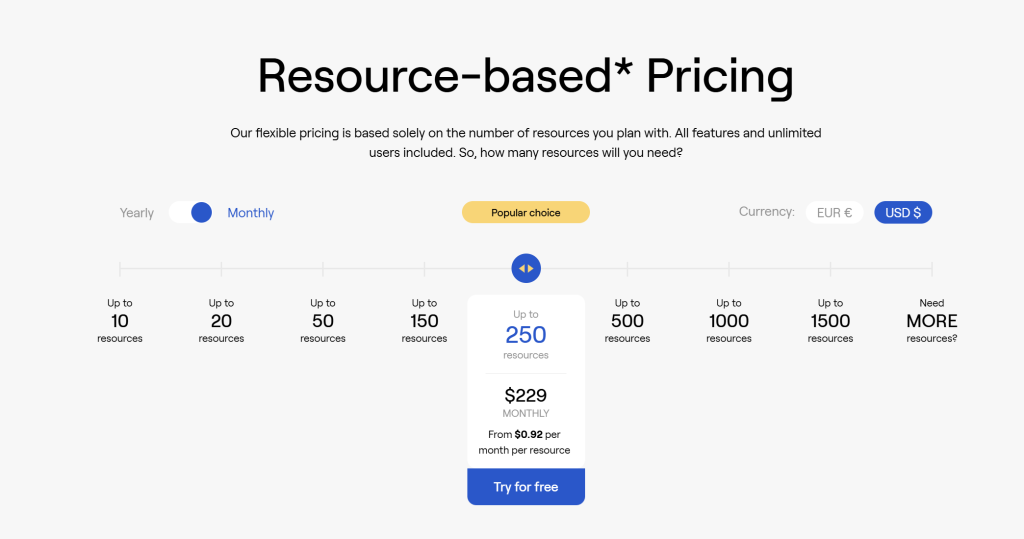
- The monthly pricing includes all the features for paid plans.
- It covers all users (owners, admins, regular users).
- The more resources you have, the less you pay per resource.
Want to learn more?
Find out more about how we charge on our Pricing page!
Here’s what that looks like at three different scales.
Example 1: the consultancy
A 40-person consultancy schedules its 40 consultants, so it pays for 40 resources. When the firm grows to 55 consultants, the price grows with the plan. But when it adds an office manager, three finance people, and a big sales team who all need to see the schedule, the price doesn’t move, because nothing new appeared on the timeline.
Example 2: the field service company
An installation business runs 55 technicians and 15 vans and they schedule all of them: 70 resources in total. The vans count the same as the technicians, because no job happens without both and they are scheduled too. Everyone who needs to check, edit, or simply view the plan works inside the same live schedule: the dispatcher, the warehouse team, and the back office all follow the work without adding a cent to the bill.
Example 3: the engineering firm
A test laboratory schedules 80 engineers, 20 test benches, and 10 measurement rigs, so it pays for 110 resources. The same booking often ties several of them together: one certified engineer, one bench, one rig, reserved as a unit for a three-day test. Ganttic counts the resources once, on the timeline, no matter how many bookings share them, and the lab’s clients who follow test slots from outside log in at no cost.
What “unlimited users” should include
If free user seats are what brought you here, one caution from our side: check what “unlimited” covers.
Some tools offer free viewer seats with heavy restrictions, where anything beyond looking at a static page requires a paid license after all.
What Ganttic offers: unlimited users (admins, owners, regular users)
In Ganttic, unlimited means full accounts with granular permissions.
Ganttic has three user types:
- Owners with full access
- Administrators with full access except account settings
- Users whose rights are set individually, down to specific projects, resources, and data fields.
View-only access is simply a User with viewing rights, so stakeholders and clients can follow the plan without editing it.
A typical setup in Ganttic looks like this: project managers can hold complete editing rights, team members can update their own tasks, and stakeholders or clients can get view-only access, all at no per-user cost.
Sales can check engineering’s real capacity before promising a deadline, and every technician sees their schedule live rather than in a day-old PDF.
When the whole organization reads the same plan, resource allocation turns into a shared conversation instead of a weekly email. That transparency is the actual product; the pricing model just stops standing in its way.
FAQ
It’s a pricing model where the cost depends on how many resources you schedule, such as people, machinery, vehicles, or rooms. User accounts are separate from pricing and stay unlimited.
A resource is anything you plan on the timeline. A user is anyone who logs in to view or edit those plans. You pay for the first, never the second.
Your resource count can scale up or down as operations change, so you pay for the capacity you currently run. Hiring more people who need access never affects the price.
Sure. If you have a question about pricing or a product feature that’s easier asked over a demo, then feel free to book one.