Estimated reading time: 8 minutes
Overview
Ganttic is a real-time resource management platform built to solve the structural coordination problems that occur when projects and teams scale beyond the capability of manual tools. Unlike spreadsheets that rely on constant human vigilance to catch double-bookings, Ganttic centralizes people, equipment, and facilities onto a single live timeline with built-in scheduling logic. This prevents version control chaos and broken formulas while providing real-time visibility into capacity across an entire portfolio. For specialized sectors like engineering and construction, it replaces static rows with dynamic filtering for certifications and skills, ensuring the right resources are paired and utilized effectively without the risk of overlapping.
Searching for a spreadsheet alternative for clarity and efficiency in resource planning?
If you’re searching for a reliable spreadsheet alternative for resource planning, you’re probably frustrated with coordination, not formulas. Ganttic helps you see the real-time availability of your resources (whether team members, equipment, or facilities) and project status, giving you both the flexibility and control you need.
Spreadsheets are flexible and familiar, which makes them the default choice for planning people, equipment, and timelines. They work well until projects start overlapping, teams grow beyond a dozen people, and resources need to be shared across departments or locations. That’s when the limitations surface.
Manual updates create version chaos, and double-bookings slip through unnoticed. Equipment sits idle in one location while teams scramble for it elsewhere. Managers spend more time cross-checking availability than planning actual work, leaving little time or energy for the actual decision-making process.

A spreadsheet alternative should solve these coordination problems structurally, not just display the same data in a different format. Ganttic centralizes resource planning in one shared environment where people, equipment, and facilities are visible on the same timeline. Conflicts get caught before they cause delays, and capacity stays clear across all projects.
Below is a practical comparison of spreadsheets versus Ganttic, focused on operational challenges rather than surface features.
Spreadsheet alternative: Why teams start looking beyond Excel
Teams usually look for a spreadsheet alternative when planning becomes harder to control.
Common signs include:
- Double-booked people or facilities
- Equipment sitting idle in one location while urgently needed elsewhere
- Multiple versions of the “latest” file circulating in email
- Managers spending more time verifying availability than actually planning
- Or simply, scaling up the teams within the organization
Spreadsheets can display data, but they do not enforce structure. There is no built-in logic to prevent overallocation. No shared system that reflects live changes across all projects. No automatic visibility into capacity across teams.
As complexity grows, spreadsheets turn into manual coordination systems. Every update depends on discipline, with every error depending on someone noticing it.
A spreadsheet alternative should solve these structural problems, not just present data differently.
Controlling overbooking and capacity
Real-time visibility vs static files
One of the most critical differences between spreadsheets and Ganttic is real-time visibility.
In a spreadsheet-based setup:
- Availability lives in one tab
- Project timelines in another
- Equipment planning in a separate file
- Certifications or skills tracked elsewhere
Even if all of this technically exists, it does not exist in one connected system.
With Ganttic, people, equipment, and facilities are planned on the same shared timeline. When someone updates an allocation, everyone sees it immediately. When a resource is fully booked, the system reflects it. When timelines shift, capacity updates visually across projects.
This real-time visibility reduces late conflict discovery. Instead of finding out that a certified team member is overbooked right before an important deadline, you see the constraint at the moment you plan.
That shift alone changes how teams operate. Find out more about overbooking and capacity in the next section.
When it comes to controlling overbooking and capacity, Ganttic relies on structure. But spreadsheets rely on vigilance.
In a spreadsheet, overbooking happens easily, and equipment conflicts are discovered late. Moreover, capacity calculations require manual effort
In Ganttic, allocations are visible across all projects, and utilization can be monitored in one environment. While filtering allows you to see who is overloaded, forecasting can be done directly in the planning view.
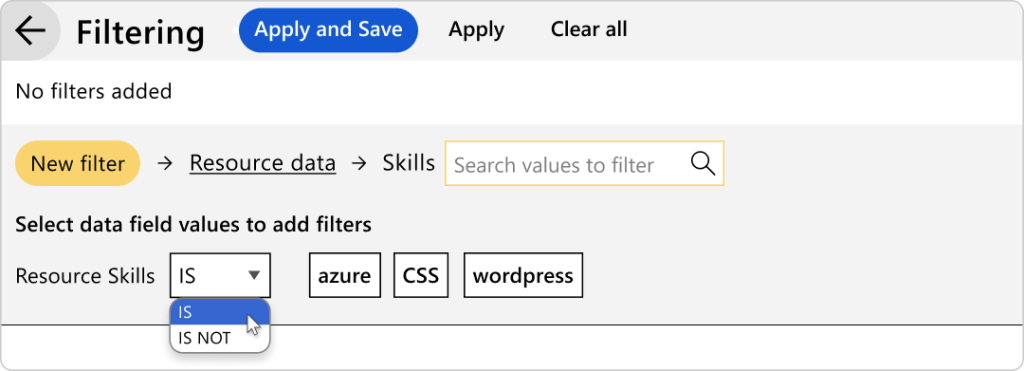
This is especially important for engineering firms, labs, construction teams, and service-based businesses where physical assets and specialist skills must align at the same time.
When a project requires both a specific crane and a certified operator, you need to see both constraints together. A spreadsheet does not naturally support that relationship. Ganttic does.
Custom data fields vs generic rows
Spreadsheets treat resources as rows of data. Ganttic treats them as structured entities.
In Ganttic, you can create custom data fields such as:
- Certifications
- Roles
- Equipment categories
- Locations
- Skill sets and many more.
These attributes are not just informational. They become planning filters.
Need an engineer with a specific certification available in Berlin next month? Filter by certification and location, then view availability instantly.
Need to check which testing units are currently deployed in a certain region? Filter by equipment type and site.
Spreadsheets can store this information. They cannot dynamically structure it for planning decisions without heavy manual setup and ongoing maintenance.
A spreadsheet alternative must embed structure into the tool itself. Ganttic replaces manual logic-building with built-in custom data fields and visual Gantt charts.
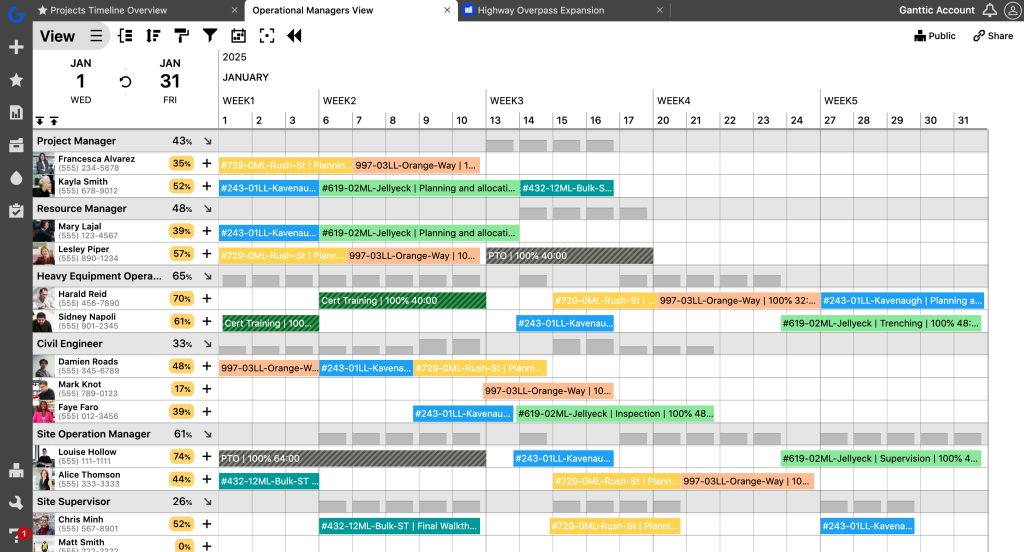
Ganttic provides total visibility into resource capacity and availability through visual Gantt charts, built to scale with your organization.
Collaboration without version chaos
Spreadsheets shared across teams often introduce version control issues:
- “Final_v13_actual_final.xlsx”
Edits made without others knowing
- Local copies that never sync back
- Manual updates forgotten
While modern spreadsheets have introduced cloud-syncing and “AutoSave” to reduce the risk of multiple file versions, they haven’t solved the problem of contextual chaos. Even in a shared Excel Online file, you face:
- The hidden row trap: A colleague filters the view for their own needs, accidentally hiding critical resource gaps from everyone else.
- The lack of audit trails: You see that a booking changed, but you don’t know why or if the project manager of the second project was even consulted
- The accidental break: A shared user deletes a formula or a data validation rule, and the “Conflict Detection” you spent hours building silently stops working.
Ganttic operates as a structured, shared environment designed specifically for multi-user planning. Plans live in one system where views are personalized but the data remains integrity-protected. There are no “broken formulas” because the scheduling logic is hard-coded into the platform.
For distributed teams, this becomes even more important. Engineering services firms, labs, and multi-site operations need a single source of truth. Not a folder of historical files.
Plus, Ganttic offers resource-based pricing. This means you only pay for the resources you will need to schedule on Ganttic. All users including collaborators, partners, clients, and viewers are free of charge.
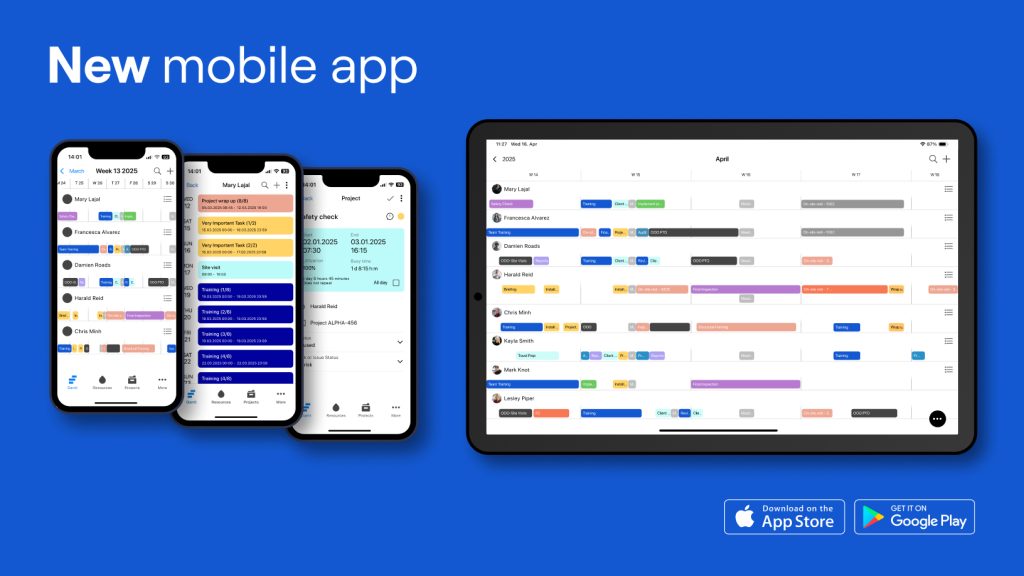
Is your team in the field? With the Ganttic mobile app, checking resource availability and project progress on the go is effortless!
Scaling from 10 resources to 5000
Spreadsheets often work when teams are small. The real challenge appears when:
- You manage dozens of concurrent projects
- Resource pools exceed 50 or 100 people
- Equipment fleets expand
- Multiple departments rely on the same specialists
At that point, scrolling through rows becomes inefficient. Filtering becomes fragile and reporting becomes manual.
Ganttic supports large resource pools while maintaining clarity through:
- Segmented views
- Filters by custom data fields
- Project view and resource view switching
- Capacity visualization across time
Instead of navigating complexity through spreadsheets, teams navigate it visually.
Find out how to add resources to Ganttic, whether it is a team member, a piece of equipment, or a facility:
Where spreadsheets still work
Spreadsheets remain useful for:
- Simple task tracking
- Budget calculations
- One-off analysis
- Small, stable teams
If your planning environment is predictable and resources rarely overlap, you may not feel urgency to change.
But once planning becomes interconnected, shared, and time-sensitive, the cost of spreadsheet-based coordination rises.
The question is not whether spreadsheets are powerful, but whether they are built for live, multi-resource planning.
Ganttic as a spreadsheet alternative: Getting the most out of your resources
Here is a practical comparison:
Spreadsheets
- Manual conflict detection
- Static data until someone updates it
- No built-in allocation logic
- Multiple disconnected files
- Limited structured filtering for planning
Ganttic
- Real-time allocation visibility
- Shared planning environment
- Capacity and utilization monitoring
- Custom data fields for structured filtering
- Visual Gantt-based scheduling across people, equipment, and facilities
If your team spends time:
- Cross-checking availability
- Fixing accidental overbookings
- Reconciling mismatched files
Explaining delays caused by coordination gaps
Then the cost of spreadsheets may already exceed the cost of a dedicated system.
Ganttic was designed specifically for resource and capacity planning. It brings structure, real-time visibility, and control into environments where coordination matters.
If you are evaluating a spreadsheet alternative, the most effective way to compare is to test it with your own real planning scenario.
Start a free 14-day trial of Ganttic or book a demo to see how it fits your workflow.
Written by
Gökçe Karabay
Marketing Lead at Ganttic