Ganttic vs Resource Guru comparison: mobile, money, and where the two pull apart
Mobile access
We put this first because for a lot of companies it ends the evaluation early.
Resource Guru does not have a native mobile app. Its Schedule is optimized for mobile browsers, and the help center documents how to save a shortcut to it on your phone’s home screen. That is a workable arrangement for an office-based team checking a booking between meetings. It is a harder sell for a site supervisor confirming tomorrow’s crew assignment from a half-built warehouse with one bar of signal.
Ganttic ships native apps on iOS and Android. Field staff open the planner, see what they are assigned to, and get on with it. In construction, engineering, and field service operations, most of the workforce is nowhere near a desk, so phone access determines whether the schedule actually reaches the people doing the work or stops at the office door.
Office-based teams can skip this section. Everyone else should test both tools on a real phone before signing anything.
Pricing: per person versus per resource
Headline prices mislead here, so it is worth running the arithmetic on your own numbers.
Ganttic charges by the resource pool. PRO 20 is $25 per month. PRO 50 is $59. PRO 150 is $149. The pool is whatever you plan with, human or not, and users are free. Twenty planners or two hundred viewers, the invoice does not move. You can see every tier on the pricing page.
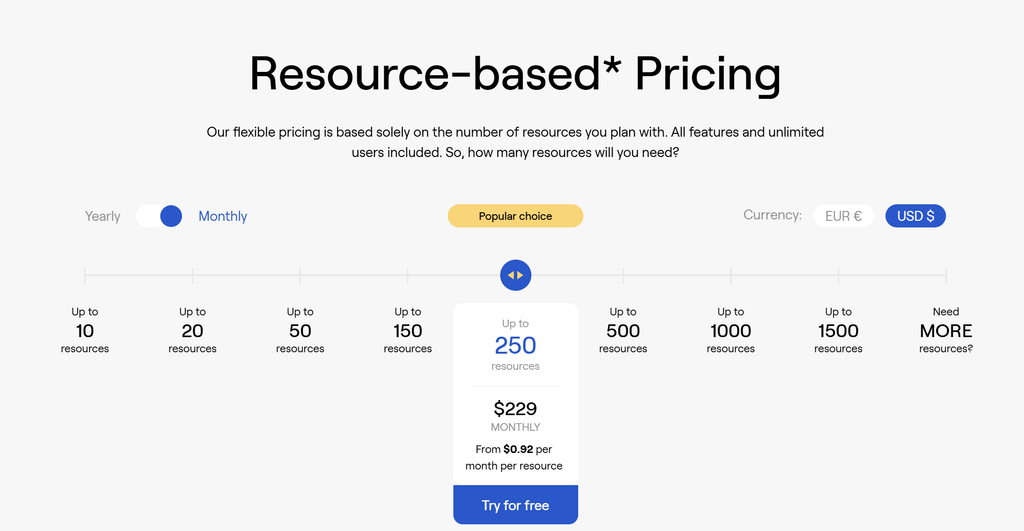 Ganttic charges per Resource. All features and unlimited users included.
Resource Guru charges per person, plus a second rate per non-human resource. Take a building services contractor with 50 staff and 20 service vans. On Blackbelt billed annually, that is 50 × $8 plus 20 × $4, so $480 a month, or $5,760 a year. The same pool in Ganttic sits in PRO 150 at $149 a month, or $1,490 a year.
Now add the thing that quietly breaks budgets: visibility. Say ten department heads and a client-side project manager want to check the schedule themselves instead of emailing you for a PDF. In Resource Guru those eleven people are billable additions. In Ganttic they are users, and users are free. That single difference is why we wrote a whole piece on resource-based versus user-based pricing, because it decides who is allowed to participate in planning at your company.
One more line in the fine print worth knowing: Resource Guru includes a fixed allowance of placeholder resources (1 on Grasshopper, 5 on Blackbelt, 10 on Master). Placeholders beyond that allowance are billed at the full per-person rate. If you plan unfilled roles months ahead, which most consultancies and agencies do, budget for it.
Feature gating
Ganttic includes every feature on every paid plan. Custom Data Fields, reports, utilization tracking, the API, and SSO across Google, Microsoft Entra ID, OneLogin, or any SAML 2.0 provider. Your plan size sets your capacity and nothing else.
Resource Guru tiers it. Reports, timesheets, Gantt charts, heatmaps, and custom fields begin on Blackbelt. Approval workflow, SSO, and phone support are Master only. Activity history runs 7 days on Grasshopper, 90 on Blackbelt, and unlimited on Master. That is a legitimate way to package software, but it means the plan you need is often not the plan you priced. A 35-person team that wants SSO lands on Master at $12 per person per month billed annually, which is $5,040 a year before you add a single vehicle. In Ganttic, SSO across Google, Microsoft, OneLogin, and SAML 2.0 comes with any PRO account.
Custom data and filtering
Ganttic lets you attach unlimited Data Fields across nine field types to resources, tasks, and projects. Teams use them for certifications, skill levels, service intervals, license classes, depot locations, and whatever else their industry demands. Then they filter the planner by those fields and find the right combination in seconds. For a capacity planning problem like “which certified operators are free in the northern region next week,” that filter is the whole job.
None of that is mandatory. Plenty of accounts run with no custom data at all, as a plain drag-and-drop board.
Resource Guru has custom fields and good filters by skill, team, and role, capped at 10 fields on Blackbelt and unlimited on Master.
Support and onboarding
Ganttic includes unlimited support on every plan, free support demos during and after your trial, and a real person on the other end rather than a bot. Teams migrating off a shared spreadsheet usually need a couple of sessions to get their resource structure right, and we would rather give those away than watch an implementation stall.
Resource Guru offers chat and email support on all plans. Phone support is Master only, during set hours in GMT/BST, with callback requests available outside them.
The best fit depends on what you need
If your whole team works from a desk, your headcount barely moves, and you want vacation requests and weekly timesheets handled inside the scheduler, Resource Guru is worth a look. It runs leave management on every plan and timesheets from Blackbelt up. Ganttic has a Time Off feature and holiday reporting, but it does not run formal leave approvals and it is not a time tracking tool.
For most of the companies we talk to, the deciding factors sit elsewhere.
Equipment that carries real weight in the plan is the clearest case for Ganttic. A van, a crane, and a project manager are the same kind of object at the same price, on every plan including the free one, so nothing gets left off the timeline for budget reasons.
The second is an audience. Unlimited free users means operations directors, site managers, and clients can all watch the schedule without anyone first working out what letting them look will cost. Crews in the field are covered the same way, through the native iOS and Android apps.
Then there is scope that keeps moving. Run Ganttic as a plain drag-and-drop board in week one, then grow it into a full resource management database with custom fields describing certifications, service intervals, and locations. Every feature is on every paid plan. Your price changes when your capacity changes, and not before.
Try Ganttic free for 14 days
Spot bottlenecks before they cost you a deadline. Cut idle time on expensive assets. Give everyone who needs the schedule a way to see it without buying them a seat.
The trial runs 14 days with every feature unlocked and no credit card. Add your whole resource pool, invite as many people as you like, and see what the plan looks like when nothing is left out of it.
Start for free!
FAQ
Resource Guru bills per person per month plus a separate rate for each non-human resource. On annual billing that is $5 per person on Grasshopper, $8 on Blackbelt, and $12 on Master, with other resources at $2.50, $4, and $6 respectively. Prices went up across all plans on July 1, 2026. Ganttic bills by the size of your resource pool: free up to 10 resources, $25 per month for 20, $149 for 150, with set packages to 1,500 and custom quotes above that. Users are free in Ganttic on every plan.
Yes, but on different terms. Resource Guru supports non-human resources at a separate per-item rate on top of your per-person charges. In Ganttic, a van and a project manager are the same kind of object at the same price, and non-human resources are included on every plan including the free one. If equipment is a meaningful part of your plan, that distinction compounds quickly.
Ganttic has a Time Off feature for blocking availability and can build holiday-only reports, but it does not run formal leave request approvals, and it is not a time tracking tool by design. Teams that need granular time tracking usually connect a dedicated tool through the Ganttic API. Resource Guru includes a leave module on all plans and weekly timesheets with approvals from Blackbelt up.
Ganttic has native apps for iOS and Android. Resource Guru does not ship a native app. Its schedule is mobile-optimized in the browser, and the help center walks through adding a shortcut to your phone’s home screen.
In Resource Guru, yes. Their billing policy charges for every person added to the account, whether they log in or not and regardless of permissions. In Ganttic, no. Users are unlimited and free on every plan, so you can give Owners, Admins, and view-only stakeholders access without touching your bill.