A review of Ganttic, written by the Ganttic team, and honest about both directions.
Estimated reading time: 11 minutes
Quick Answer
Ganttic is a flexible resource planning software designed for scheduling people, equipment, vehicles, and/or facilities on one visual timeline. Available as an online web planner and mobile app, its intuitive interface and short learning curve make it a powerful alternative to spreadsheets. Beyond basic “drag and drop” scheduling, Ganttic provides teams with complete clarity and control, offering deep customization through features like custom Data Fields to adapt to any unique workflow. If you need a clear, comprehensive overview of your resources and projects in a tool that flexes to your needs, Ganttic is built for you. Conversely, teams looking for rigid and heavy automation, AI-driven task assignment, an all-in-one platform, or a simple shift planner will be better served by another solution.
We hear some version of “Is this actually right for us?” on nearly every sales call. The answer shouldn’t take months of use. Here’s the direct breakdown: what Ganttic does, who it’s built for, who it isn’t for, and why.
Who Ganttic Is Built For
- Resource managers scheduling people and physical resources (multi-resource)
- Managers looking to have an overview of their capacity and availability for strategic planning
- Project managers running multiple projects from one resource pool
- Managers looking for a service scheduling tool
- Operations managers who outgrew spreadsheets but don’t want an enterprise suite
- Teams on the go looking for a flexible planner with a mobile app
- COOs and team leads who want a human to have the final word
- PMO leads coordinating many users and collaborators
Who Ganttic Isn’t Built For
- Schedulers whose only need is heavy automation
- Teams looking for a shift planner
- Managers looking for AI features in their planner
- Project portfolio managers looking for an all-in-one tool
Read on to find out why and how.
What Ganttic Does
Ganttic is a resource scheduling tool that gives you a visual timeline for everything that can be booked: people, machinery, vehicles, rooms, test benches, and so on. Drag and drop to schedule, and pivot the whole plan between a Resource View and a Project View in one click.
That pivot is the core of it. Most tools show you either the project or the people. Ganttic shows both, so a double-booked engineer or an idle machine surfaces before it costs you a deadline.
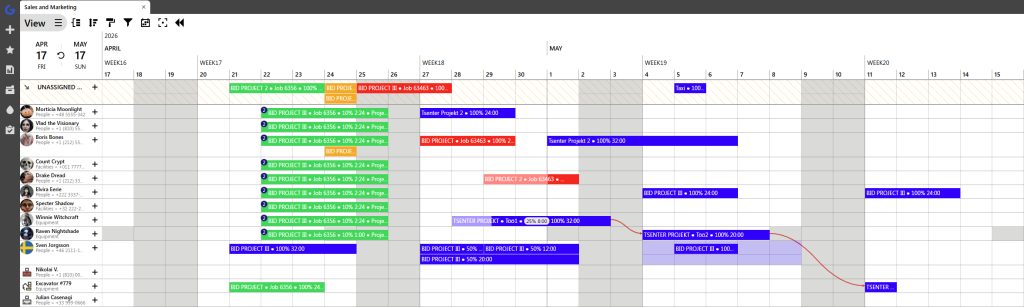 Resource View on the Ganttic Planner
A Planner Built on 3 Dimensions
No two Ganttic planners are alike, because Ganttic is designed to adapt to your specific reality across three dimensions:
- Complexity: Some clients use it purely as a lightweight drag-and-drop visual board. Others build highly complex, in-depth workflows.
- Data Depth: You can operate with zero extra data. But you can also utilize our custom Data Fields to track skills, certifications, maintenance cycles, and dozens of other variables.
- Orientation: You can run the platform completely project-oriented (focusing on phases and deadlines) or entirely resource-oriented (focusing on utilization and capacity).
How does it happen? There are different features that make Ganttic flexible.
Thanks to fully customizable Data Fields, you can add specific details about your resources. Based on that, you can easily filter out the exact information you need when tracking an employee’s workload, a piece of equipment’s features, a facility’s availability, or finding the best fit for a specific task.
Alongside the planner itself sit other vital pieces: utilization and capacity tracking, portfolio-level overviews, shareable views for stakeholders, automatic reports, and calendar sync with Google.
See which problems Ganttic solves:
- The Port of Hanko (Finland) has used Ganttic for 13 years to visually manage over 1,200 vessels annually, sticking with it despite the rise of niche maritime software.
- EDAG Group, one of the world’s largest independent engineering service providers, runs its workflows on Ganttic, coordinating thousands of hours of highly technical tests.
- The Laboratory of Applied Thermodynamics (LAT) at Aristotle University in Greece coordinates 50+ staff, testing sites, and heavy machinery after outgrowing spreadsheets and struggling with rigid software.
- Q Agency has 40+ users, from line managers to finance, in Ganttic daily to track workloads, billable hours, and see exactly who is on the bench for the next project.
Want to see how Ganttic solves bottlenecks in your specific field?
Explore our Case Studies to read more stories from our clients!
Different industries, same underlying problem: too many moving parts for a spreadsheet, and a need to see people and physical resources on the exact same plan.

Who Ganttic is built for
If any of these sound like your team, Ganttic will likely feel like it was made for you.
Resource managers scheduling people and physical resources (multi-resource planning)
Some of our clients only handle people, but some do multi-resource planning. Whatever or whomever your resource is, Ganttic treats a crane, a lab bench, or a company van as a resource with its own row, its own schedule, and its own utilization numbers. If your plans fall apart because equipment and staff live in separate systems, this is the fix.
Managers looking to have an overview of their capacity and availability for strategic planning
Strategic planning is useless if you don’t know your actual limits. Too many companies overcommit to new projects simply because they don’t have a clear, high-level view of what their team can actually handle.
Ganttic pulls you out of the daily task view and gives you a clear, portfolio-level overview of your capacity. Here are some scenarios:
- People: Instantly see that your project manager is double-booked across three sites, while a junior consultant has free time this week.
- Equipment: Spot that your heavy machinery is scheduled for maintenance exactly when a new construction phase begins.
- Strategy: Know for a fact if your team has the bandwidth to say “yes” to a new client next month.
When you have a visual baseline, you can forecast hiring needs and make strategic promises based on hard data, not just optimism.
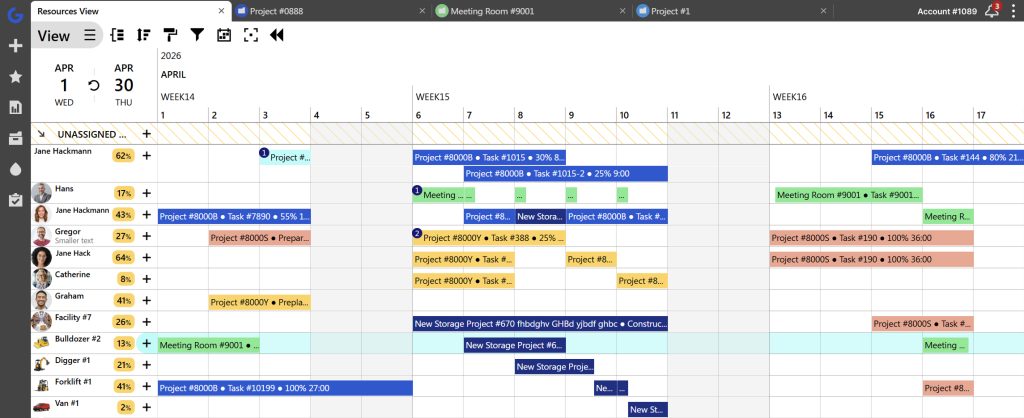
Project managers running multiple projects from one resource pool
In Ganttic, you can manage multiple projects, tasks, and resources. With Resource and Project views, you can track both availability and deliverability easily.
You can see the portfolio from the top and each person’s week up close. Same data, one click apart.
Service scheduling is essentially a complex matching problem. You aren’t just booking time; you have to match the right person, with the exact right skills, often alongside a specific vehicle or piece of equipment, to a client’s site. Because Ganttic relies on custom Data Fields, you can filter your entire resource pool in seconds.
If you need a technician with a specific safety certification who also has an open company van on Tuesday morning, Ganttic surfaces them instantly. It gives service managers the speed and precision they need to dispatch teams without the constant fear of double-booking.
Operations managers who outgrew spreadsheets but don’t want an enterprise suite
Ganttic is the sweet spot between spreadsheets and enterprise suites. It is built for managers who have outgrown Excel,especially when dealing with the nightmare of tracking part-time tasks and fractional allocations, but want to avoid the bloat of a full-scale ERP.
Ganttic scales effortlessly from boutique companies with 30 resources to massive enterprises managing large workforces and heavy machinery. It comes with a web planner so everyone can see the adjustments right away.
While some organizations require a heavy, all-in-one system to handle everything from bookkeeping to HR, Ganttic focuses purely on powerful and flexible resource planning.