Three deliberate choices behind how Ganttic works
What a planner leaves out tells you more than its feature list does.
Depth in planning over breadth across the business
What Ganttic does cover is resource scheduling, the project layer above it, and a portfolio view above that. Documents, chat, proofing, and sales pipelines sit outside the product.
That focus is why the planner holds up at 5,000 resources and why most teams are scheduling in their first session rather than their first month. The cost is real: if you hoped to retire four subscriptions with one purchase, this is not it. Many clients run Ganttic alongside an ERP instead, connected through Google Calendar sync or the open API.
Lightweight automation over heavy automation
Ganttic handles lightweight automation and includes a REST API on every paid plan. What it will not do is reshuffle your schedule when something upstream moves, or chain rule-based approvals together.
Automation repeats the process you already have, including the weak parts. A flawed allocation rule, once automated, produces flawed allocations faster. Ganttic surfaces the conflict, the gap, and the utilization figure, then stops. If you want a workflow engine firing triggers all day, this will feel restrained. If your planners are tired of software quietly moving things overnight, it will feel like a relief.
Resource count over seat count
Ganttic charges for the resources you schedule and keeps users free and unlimited on every plan, including the free one. A yard with 24 technicians and 16 machines is 40 resources on the bill, and that figure holds whether four people ever open the planner or ninety do.
Teams with a small planning group and a large audience usually come out ahead on this. Schedule 400 resources with two people who ever log in, though, and per-seat pricing may well be cheaper. Run both numbers before you commit either way.
One planner, two depths
For most teams the deciding factor turns out to be range: whether the tool can run as simply or as thoroughly as the operation actually requires.
At its lightest, Ganttic is an online Gantt chart you drag tasks across. Rows are resources, bars are bookings, and you can be planning within an hour of signing up. Nothing needs configuring first.
The depth sits underneath, in custom Data Fields. There are nine types to choose from and no ceiling on how many you set up, across resources, tasks, and projects. What you record is up to the operation: a welding ticket that expires in March, the site access a contractor holds, the load rating on a lift, the date a rig is due for service. Because every one of those becomes something you can filter and group by, questions that used to take three phone calls turn into a filter on the planner.
None of it is compulsory. Some accounts never add a single field and work fine that way; others end up with something closer to an asset register. You can also begin in the first camp and drift into the second, six months or two years later, without rebuilding the planner to do it.
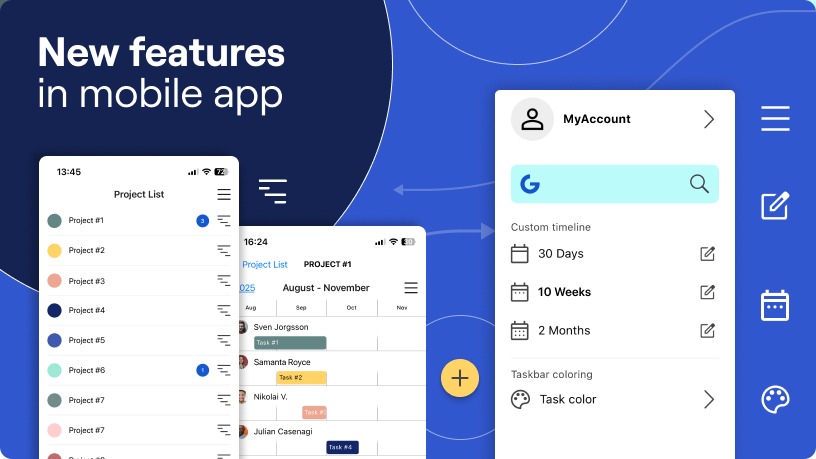
The mobile app puts that same plan in a pocket, on iOS and Android, included with any paid subscription. What a foreman sees there is the live schedule rather than a stripped-back to-do list: the timeline view, a read on who and what is free, or just today’s agenda. Shift a task on site and the office has it. For operations spread across depots and job sites, that beats any row on a feature grid.
Signals that Ganttic is the best resource planner for your team
- People and equipment live in separate systems, so nobody can confirm the operator and the machine are both free on Tuesday.
- Your planner spends Monday morning answering availability questions by email.
- You commit to work you cannot staff, because nobody had a capacity view before the contract was signed.
- Crews in the field need today’s plan on a phone, not last week’s PDF.
- You need to filter by skill, certification, location, or service interval, and your spreadsheet cannot do it.
We would rather say this now than two months into a rollout.
Heavy automation
Ganttic covers lightweight automation, and the open API lets clients build further on top of it. What it will not do is run complex rule chains, fire conditional notifications, or rebuild a schedule on its own when an upstream date moves. If that engine is the main thing you are buying, a broader work management platform is the right category.
AI forecasting and analysis
Ganttic has no AI features, and that is a choice rather than a gap in the roadmap.
The information that should drive a scheduling call is often nowhere near the database. Somebody is quieter than usual in a Monday meeting. A client has a reputation that never made it into a CRM note. An engineer is technically free next week and badly needs the week anyway. Those are the inputs a good planner weighs, and a model reading your resource table has access to none of them. Our preference is to hand you a clear picture and let you decide what it means.
We would rather give you the visibility and let you make that call. If an AI scheduling assistant is specifically what you are shopping for, that is a different product.
An all-in-one platform
Being a dedicated planner is the whole design. Going deep on scheduling meant not spreading into chat, documents, proofing, and CRM, and we took that bargain knowingly. It does not leave Ganttic working alone, though. At EDAG Group, the planner sits on top of SAP and a set of internal tools as the layer where scheduling actually happens, and the team reports planning time down by a quarter or more since the switch. The Port of Hanko feeds the planner from outside systems through the API, so arrival times, weather, and traffic show up on the schedule itself.
EDAG Group runs Ganttic as the visual scheduling layer alongside SAP and its own internal data tools, and cut planning time by at least 25 percent in the process.
The Port of Hanko pushes live vessel ETAs, weather, and traffic data onto the planner through the API.
How to test fit in a week
Skip the feature checklist. Write down the two or three things that break in your current setup, build only those in a trial, and see whether they hold.
You get two weeks on the free trial, nothing held back behind a tier, and no card details asked for.
Stay at 10 resources or under and it costs nothing once the trial is over. For a second pair of eyes, book a demo and a person will walk through your setup with you!
FAQ
Project management software organizes tasks and deadlines. A resource planner starts a step earlier, with what you have available. It answers whether the people, machines, and facilities a plan depends on are free, and reports utilization across the portfolio rather than progress on individual tasks.
Yes, and most accounts move between the two over time. You can run it as a plain drag-and-drop Gantt chart with no extra data, or attach custom Data Fields for skills, certifications, specifications, and service intervals. Nothing extra needs buying to add equipment, and a machine costs the same to plan with as a colleague does.
It has lightweight automation, plus a REST API on every paid plan for teams that want to connect it to other systems. It does not run rule-based workflow chains or reshuffle schedules automatically.
Yes, on every plan including the free one. A person, a drill rig, a lab bench, and a van each get their own row, schedule, and utilization figure. There is no separate module and no price difference between human and non-human resources.
Because the signals that matter often are not in the data. A manager hears strain in a phone call and knows which technician suits a difficult client. Ganttic provides the visibility and leaves that judgment where it belongs.
Sign up for a 14-day free trial! No credit card required. All features are included. Plus, you can book a personalized demo session with our team.