Estimated reading time: 4 minutes
Overview
Ganttic’s new View Tracking feature extends the History Log to include every modification made to the “Views” in your workspace. This update allows admins to see exactly who changed a filter, tweaked a timeline setting, or shared a view via a public URL, and when. By providing a searchable audit trail of configuration changes, the feature eliminates the guesswork when a resource “disappears” or a project timeline looks different. It is designed to maintain workspace integrity and data security in shared planning environments, ensuring that all managers are working from a consistent, unified version of the truth.
We’ve updated the Ganttic web app to give you more oversight of your workspace. While you have always been able to track changes to your projects, resources, and tasks, we have now extended the History Log to include Views. This update ensures that any modification to how you visualize your data is recorded, providing a clear trail of who changed what and when.
In a shared planning environment, different admins and users with permission can make different changes. A single accidental change to a filter or a view setting can skew the entire team’s perspective.
When a resource seems to disappear or a timeline looks different than it did yesterday, the problem is usually a modified view setting rather than a data error. This update solves that friction by providing a searchable history of every configuration change, allowing you to quickly identify the source of the change and maintain a unified version of the truth across the organization. In short, you have full control over your workflow.
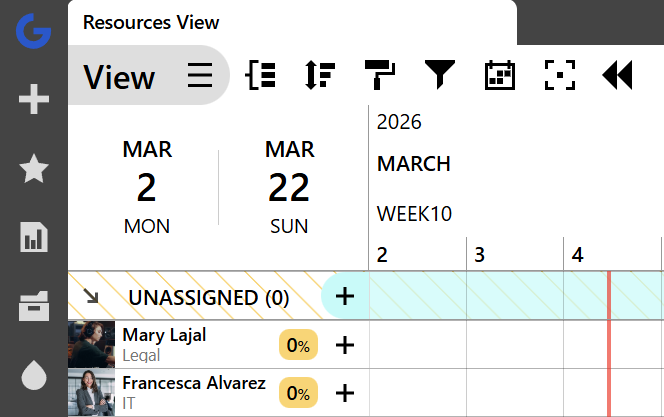
Click the G in the top left corner to see the History Log.
What’s new in the History Log?
Before the update, the History feature was only available for viewing user information, projects, resources and tasks. Now, however, it also includes views!
How to navigate:
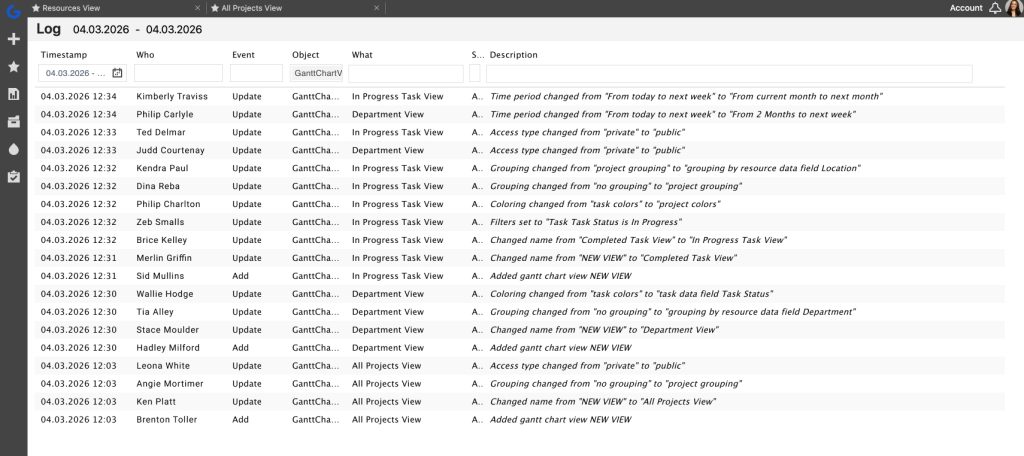
By clicking the G in the top left corner or navigating to the History Log through your Projects or Resources tabs, Admins can now find a detailed record of:
- Filter & Setting adjustments: See exactly when a View was modified. If a specific skill filter was added or a time-slot setting was tweaked, it’s now in the log.
- Permissions & Access: Track which users were given or denied access to specific views, ensuring your internal privacy standards are upheld.
- Public sharing: Monitor when a View was shared via a public URL. This is particularly useful for teams collaborating with external contractors or clients who need to see real-time updates without having full app access.
Why workspace tracking matters
This change is about maintaining the integrity of workspaces. When multiple managers are planning across the same resource pool, visibility into the settings of the tool is just as important as visibility into the data.
With this update, you can:
- Eliminate troubleshooting time: Instantly see who changed a view instead of asking the whole team.
- Ensure data security: Keep a close eye on who is sharing your operational capacity externally.
- Maintain Consistency: Ensure that your Standard Engineering Resource View or Q2 Construction Plan stays exactly as it was intended to be.
3 things to know & what next:
- Web app exclusive: These logs are currently available on the Ganttic web application for Account Admins.
- Real-time logging: History for views began with this latest update, as of February 22, 2026. While changes made prior to this week aren’t visible, every modification from this point forward is being logged.
- Coming soon: We are currently testing Report History, which will bring this same level of transparency to your data exports and reporting templates!
To get the most out of all Ganttic features -which are available to trial users and for all packages- start a free 14-day trial of Ganttic or book a demo to see how it fits your workflow.