How Q agency made bench management somebody’s job
Q agency has spent more than ten years building software out of Croatia for clients including a large British publisher, an employment agency and medical researchers. Its roughly 250 people cover development, software architecture, project management, testing, business analysis and design. Resource management started where it usually does, inside each delivery team.
That stopped working as headcount and client demand grew.
In 2020 the company created a dedicated Resourcing Department, which went from one person to four within about two years. Marija Donkov, a resourcing coordination expert who joined in 2021, puts the benefit plainly: with a dedicated team, the project managers do not have to think about it.
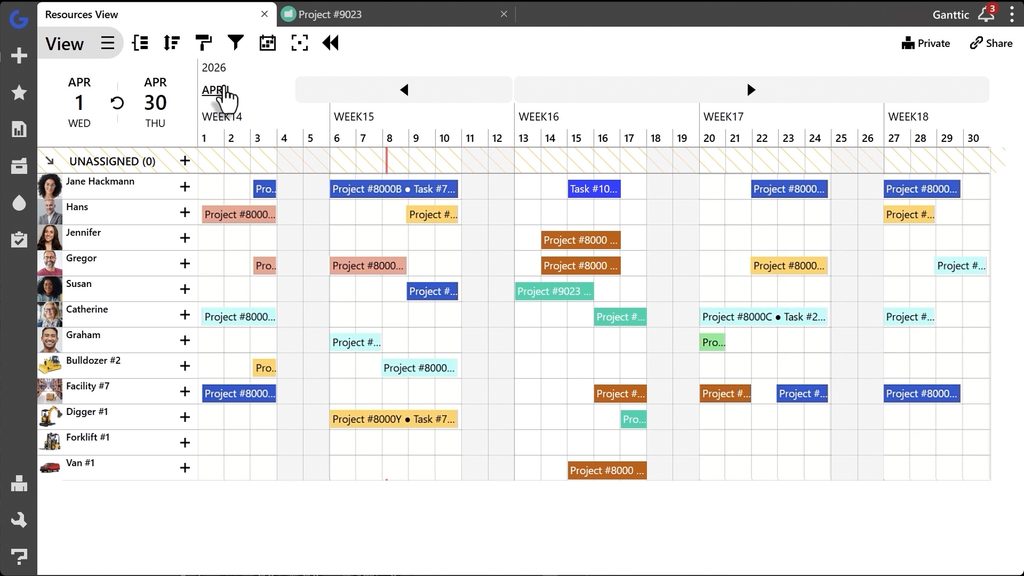 Ganttic’s straightforward interface makes planning easier than a flat spreadsheet or a complicated project suite.
She calls the arrangement a win-win, and the significant part is the order of events. Q agency changed the org chart first and the tooling second. A dedicated resourcing function needed a dedicated resourcing tool, which is when Excel and Google Sheets gave way to Ganttic.
That sequence is worth copying before any software decision. Bench management is a role, and a planner only makes the role easier to do.
How Ganttic solved resource utilization for a 250-person agency
Donkov’s reason for liking the tool is narrow and specific: it is dedicated only to resource planning. For a team whose entire job is matching people to work, that narrowness is the feature.
The planner holds around 300 resources for roughly 250 staff, with about 40 further users logging in to look: line managers, team leads, department managers and finance.
More than 40 Resource Data Fields carry skills, seniority, location and line manager, so finding an available senior developer with a given tech stack in a given office is a filter rather than a round of messages.
Skills management keeps each developer’s stack current.
Saved Views sort the pool by time frame, utilization, seniority or technology, which is what turns the bench from a hunch into a list.
Editing stays with the Resourcing team while everyone else gets view access through user rights, so the plan has exactly one owner and 40 readers. Weekly and monthly utilization reports go out to stakeholders, exported to Excel for the people who still want a sheet.
Donkov describes what they ended up with as a big database as much as a planner, which is a fair description of what resource utilization tracking actually requires: one place where availability, skills and history all agree.
The two integrations that keep the plan honest
Two API connections stop the plan drifting from reality. HiBob, the HR tool, syncs vacation and time off automatically, so available hours reflect who is actually at work rather than who is on the payroll.
Teamwork pushes logged hours back in as Used Time on each task, which is what connects the plan to what was really spent and what finance needs for billing.
That second feed is the one most teams skip, and it is the difference between a utilization number and a forecast nobody reconciles.
Set both up once and nobody has to defend the numbers in a Friday meeting. The bench becomes part of the workflow, which is where it should have been all along.
See your own bench
Q agency’s order of operations is the part is inspiring, and starting costs nothing. Decide who owns the bench before deciding what they own it in. That owner can be one person doing it part time, which is exactly where Q agency began.
The planner then earns its place in the same order they built it.
Resource Data Fields for the attributes you actually staff on, which for most agencies means skill, seniority and location.
Skills management so tech stacks stay current as people learn things. One saved View sorted by utilization, and the bench list maintains itself.
Then the piece that makes the rest hold: a single editor with everyone else on view rights, so the schedule stops being renegotiated by message.
Utilization reports when finance wants numbers, and the API once your HR system should be feeding time off in by itself.
Billing counts resources rather than seats, so the line managers and finance people who only read the plan add nothing to the bill. See the pricing or book a demo and we will map it to how your teams are staffed!