Estimated reading time: 7 minutes
Overview
Finding a resource planner that balances robust features with everyday simplicity is a major challenge for modern project and resource managers. This article explores why flexibility and user-friendliness are the most critical factors for your software. We will look at the hidden costs of rigid platforms and highlight how Ganttic provides an intuitive, easy-to-use solution that adapts directly to your team’s unique workflow, keeping your organization far away from spreadsheet chaos.
Why it matters to find an easy to use & flexible resource planning software
Most resource planning tools force you into a predefined box. They dictate exactly how you must manage your team, schedule your equipment, and track your ongoing projects. When software is too rigid or overly complex, your team simply will not use it. The learning curve becomes a barrier, adoption rates plummet, and managers inevitably return to the familiar but chaotic realm of static spreadsheets. A truly effective tool must work the way you do.
Many software buyers fall into the trap of evaluating tools based purely on the number of features. However, a massive feature list often translates to a cluttered, overwhelming interface. What growing businesses actually need is flexibility. Flexible software allows you to customize data fields, adjust viewing parameters, and modify schedules to fit your unique business processes. Your business is not static. You might need to track personnel availability today and heavy machinery maintenance tomorrow. Your software must pivot with you.
The cost of complexity
Companies lose significant time and money when they invest in bloated systems. When a tool requires weeks of training, employees resist it. They find dangerous workarounds. The lack of a centralized, easy-to-use system leads to overallocation, employee burnout, and severe project delays. When software feels like a chore, data accuracy immediately drops. If your team is not updating their task statuses or logging their availability because the interface is frustrating, your high-level overview becomes entirely useless.
Recent data confirms this usability crisis. A study published by the Project Management Institute in early October 2026 highlights the exact impact of usability on project success. The research shows that organizations deploying highly adaptable and intuitive project tools see a 42% higher internal adoption rate, which directly correlates to faster project delivery and fewer resource conflicts. You can read the full insights regarding these shifting priorities here.
The spreadsheet trap
Many companies try to solve the flexibility problem by sticking with basic spreadsheets. Spreadsheets are inherently flexible because you can create any column you want. However, they lack the specific functionality required for modern resource management. Spreadsheets do not warn you when you double-book an employee. They do not update in real time when someone else is editing a different cell on the other side of the world. They do not offer dynamic visual timelines that make capacity obvious at a single glance.
Industry analysts are noting a massive departure from this outdated method. Research from Gartner released on October 4, 2026, confirms this shift in operational priorities. Their latest software adoption survey reveals that 68% of portfolio managers now rank workflow flexibility and ease of use above advanced reporting capabilities when selecting new resource management platforms to replace legacy spreadsheets. Find the comprehensive 2026 report here.
What makes Ganttic easy to use and intuitive
Ganttic was built specifically to strike the perfect balance between power and simplicity. It takes the core benefit of a spreadsheet, which is the blank canvas approach to data, and applies it to a dedicated visual scheduling environment. You get complete control without the steep learning curve. Here is exactly what makes the platform stand out for teams worldwide.
See Ganttic in action – find out how to use Ganttic in 3 easy steps.
Visual scheduling interface
First, the visual scheduling interface is designed around a seamless drag and drop mechanism. You do not need to click through four different menus to assign a task. You simply click on a new task, drag it to the right person or piece of equipment, and drop it directly onto the timeline. If priorities change, adjusting the schedule takes seconds. It is a tactile, frictionless experience.
Custom Data Fields
Second, Ganttic offers unparalleled custom data fields. Every organization tracks different metrics. A construction firm needs to know vehicle load capacities and location zones. A design agency needs to track specific graphic design software skills and language proficiencies. Ganttic lets you build custom fields for your resources, tasks, and projects. You name the field, pick the data type, and start tracking immediately. You are never forced to use generic labels that do not fit your industry.
Customizable views
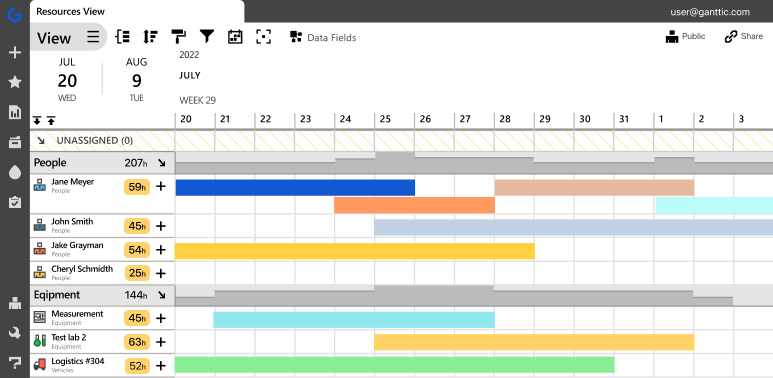
Third, the platform provides highly customizable views. Not everyone in your company needs to see the exact same data. A project manager might need a macro view of the entire year to plan long-term capacity. A team leader might only want to see what their specific department is doing this week. Ganttic allows you to create, save, and share custom views. You can filter out the noise and focus exactly on what matters to your specific role.
Real-time updates
Finally, the cloud-based architecture ensures real-time updates. When a schedule shifts, everyone sees the change instantly. There are no version control issues. The interface remains clean and uncluttered whether you are managing ten resources or ten thousand. The ultimate goal of any resource planning software is visibility. Ganttic delivers this visibility through a user experience that feels natural. The interface operates logically, meaning new hires can jump in and understand the schedule within minutes, not days.
When you remove the friction from planning, you give your managers their time back. Instead of wrestling with rigid workflows, they can focus on actual strategy, team support, and successful project delivery.
See Ganttic in action: 14-day free trial, all features included
Stop wrestling with rigid software and static spreadsheets that drain your team’s productivity. You can experience the flexibility of visual scheduling firsthand by starting a free trial of Ganttic today.
- Test out the intuitive drag and drop interface
- Build your own custom data fields
- See exactly how easy it is to manage your resources in real time.
Sign up for your free trial or book a personalized demo session to find out how perfectly the platform adapts to your unique workflow without the steep learning curve.
FAQ
Flexible software allows you to customize data fields, adjust visual timelines, and modify scheduling parameters to fit your unique business processes. It never forces you to change your workflow to fit the limitations of the tool.
With an intuitive interface and simple drag and drop mechanics, a well-designed planner like Ganttic can be learned in a single afternoon. The key to fast adoption is a clean visual layout and self-explanatory features.
Yes. Modern resource planners offer the same grid-like customizability as spreadsheets but add real-time collaboration, automatic conflict warnings, and visual tracking that static documents simply cannot provide.
Because Ganttic is built around an intuitive, visual drag-and-drop interface, the learning curve is incredibly short. The platform is designed to be as straightforward as a spreadsheet but far more powerful, meaning new users can typically understand the layout and start scheduling resources within minutes. This ease of use ensures your team can transition smoothly without suffering through days of complex software training.
To make adoption as easy as possible, Ganttic offers free, personalized demo sessions. Instead of a generic video or pre-recorded walkthrough, you get a 1-on-1 session with a product expert who tailors the demonstration directly to your industry and unique scheduling challenges. It is a completely customized, risk-free way to see exactly how the software can be mapped to your exact business processes.