Estimated reading time: 7 minutes
Overview
Most Gantt chart software simply plots tasks along a timeline. This is fine until you need to know whether the people and equipment allocated to those tasks are actually available. Below are ten things to check before committing to an online Gantt tool, along with an overview of what Ganttic can do for your organization. Ganttic is a dedicated resource planner offering in-depth data and flexibility, regardless of your organisation’s size.
Many Gantt tools assume every row is a task and every assignee is a licensed user. That breaks the moment you need to schedule a van, a test bench or a meeting room.
In Ganttic, a resource is anything you plan with: people, machinery, vehicles, rooms, or a mix of all four, priced the same on every plan. Check this early, because it is expensive to work around later.
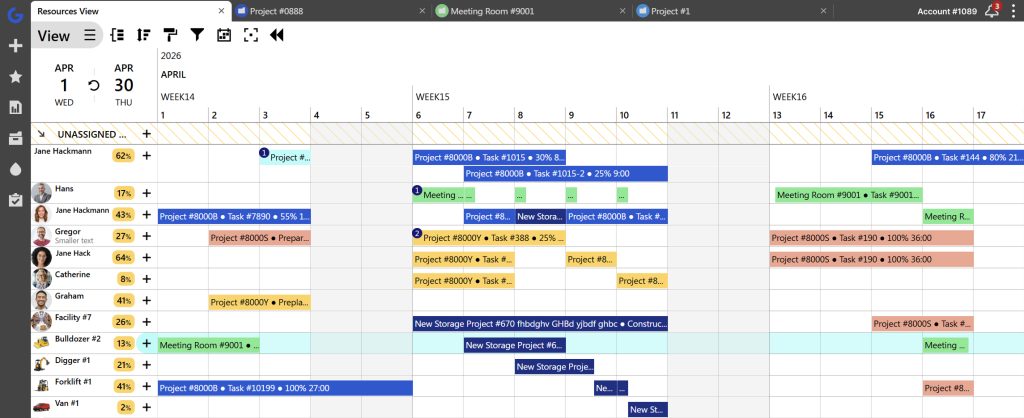 In Ganttic, a resource can be anything you need to plan: a team, a facility, or a bulldozer.
2. Pricing: how you are charged
Per user is tidy when everyone in the system does the work. It gets awkward the moment your plan has an audience, because the ops director who checks utilization on Mondays, the finance lead pulling billable hours and the client who wants sight of the timeline are all a license each. Teams respond by rationing access, and the plan quietly becomes something only three people can see.
Resource-based pricing removes that. Ganttic charges by the resources you schedule and leaves users unlimited and free on every plan, so what you pay the size of your operation rather than how many people look at it. Add a department, bring in subcontractors, give clients a view: the bill does not move. Nobody has to weigh up whether a colleague is worth a seat, and hiring does not trigger a pricing conversation.
3. Different views: whether you can flip the chart
Most tools show you the project or the people.
Ganttic shows you both, rotating between the two on the same data. Project View shows phases and deadlines, while Resource View shows who is carrying them. You can switch between them in a click. That pivot is how a double-booked engineer turns up before the deadline moves rather than after.
Watch this to learn how to switch between views and find out everything else there is to know about Ganttic!
4. Data depth: how much you can attach to a resource
A name and a date is not much to plan with. Ganttic uses custom Data Fields, nine types with no cap on how many you create, on resources, tasks and projects alike.
A technician can carry certifications with expiry dates and site clearances. A machine can carry specifications, service intervals and location. Filter and group by any of it, and finding a certified operator with a free van on Tuesday takes seconds.
You can also color taskbars by project or status, so the view stays readable as the plan fills up.
5. Utilization: does it show capacity, not just dates
Dates tell you when work happens. Utilization tells you whether it can.
Look for capacity reported as a real figure per resource and across the portfolio. It is the difference between a chart that records your plan and one that tells you if the plan is possible.
6. Flexibility: how long it takes to get running
Depth is worth nothing if nobody adopts it.
Some teams run Ganttic as a plain drag-and-drop board and are working the same afternoon. Others build something far heavier on the same foundation, with mixed resources from machinery and lab equipment to people. You can start light and add depth later without migrating anything.
It depends on the level of your planning and complexity of your operations, and how you and your team prefer to handle them.
Your board, your clients and your finance lead all want numbers, and none of them will log in to get them.
Ganttic builds custom Task, Resource, and Project reports with charts and utilization tracking. You can automate these reports to be sent via email as CSV, PDF, or HTML. Alternatively, you can give outside people limited access to the planner, or share live schedule Views directly via a simple link.
Want to add new users to your Ganttic planner? Learn all about it here: Add New Users
If work happens on sites or across depots, the plan has to travel.
The Ganttic Planner app is free on every paid plan for iOS and Android, and opens onto the schedule itself as a Gantt chart or daily agenda rather than a personal task list. Crews can check bookings, move tasks and add notes, syncing with the web planner in real time. The app opens offline, but tasks cannot be edited until you reconnect.
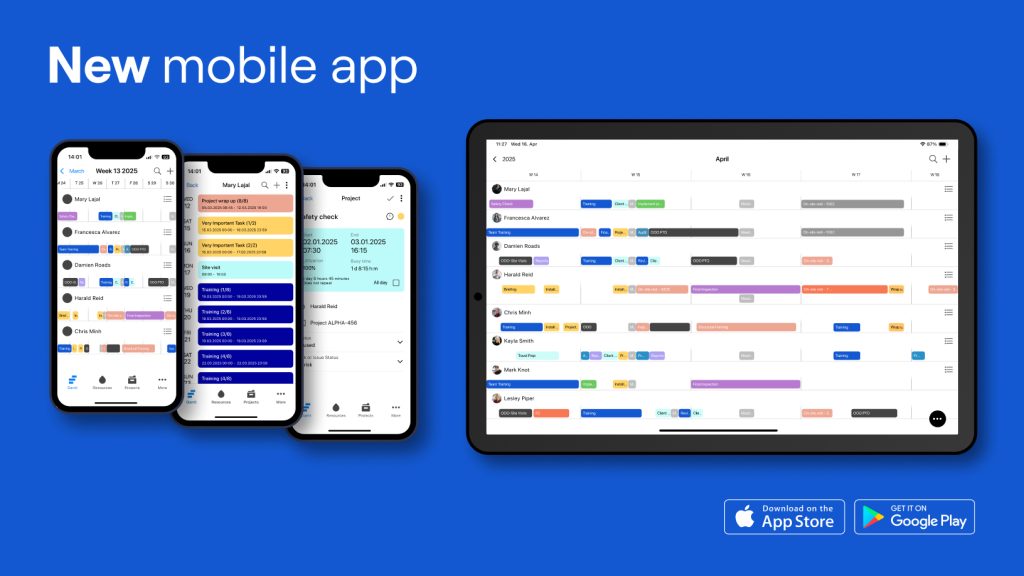
Google Play – App Store
9. Technical strength: integrations and API
Ask how data gets in and out.
Ganttic syncs with Google Calendar and has an open REST API on all paid plans.
The Port of Hanko uses it to push live vessel ETAs, weather and traffic data from external systems straight onto the planner.
EDAG uses it to create its own system: resource scheduling is one part of a larger software setup that also runs on SAP and custom internal data tools.
If you have a data team or an integration platform, that is more open than a fixed connector list.
10. Brutally honest: what it does not do
Every tool has edges, and a vendor who hides them wastes your time.
Ganttic has no AI scheduling assistant by choice, because the person who actually knows the team should be the one making the call.
Automation is light. If you need complex, rule-based workflows firing off each other, you will need a broader platform. There is no document proofing, collaborative editing, or sales pipeline.
It is a dedicated planner, and plenty of clients run it right alongside their other specialized tools.
Where to start with online Gantt chart software
Pick the two or three points above that explain why your current setup is failing, then test only those.
Ganttic’s trial runs 14 days with every feature unlocked and no credit card, and accounts with 10 resources or fewer stay free afterwards.
Start your free trial today!
Have questions? Book a demo session with our team.