13 November 2026
Key Takeaways
- 2026 revealed low CEO confidence and challenges in project complexity (PwC’s 2026 survey), highlighting the need for effective resource management strategies.
- Four strategies for 2027 emerge: centralizing resources, planning demand in scenarios, setting utilization targets with a buffer, and agreeing on priority rules.
- Ganttic Resource Planner supports these strategies with its features, providing a flexible planner for your resource pool.
- Effective resource management minimizes the impact of changing plans and project overlaps, ensuring better allocation of resources.
- Implement these strategies now to enhance your capacity planning for 2027 before January.
Estimated reading time: 6 minutes
Overview
2026 was the year of ambiguity. In PwC’s 2026 survey, CEO confidence in revenue growth hit a five-year low of 30%, and PMI found that only one in five practitioners use scenario planning. With that much uncertainty, the resources you already have decide what you can deliver. This guide covers four resource management strategies for 2027: centralize every resource in one pool, plan demand in scenarios, set utilization targets with a buffer, and agree on priority rules before projects collide. Each one comes with how we’d run it in Ganttic’s resource management software, plus a plan to start 2027 capacity planning before January.
When plans keep changing, resources feel it first. A project gets paused and a specialist is left with an empty month. Two approvals land in the same week, and the one engineer both projects need is suddenly double-booked. That’s when resource management matters most. It’s also why the 2027 resource management plan is worth building this month.
What 2026 taught resource planners
Among project professionals, 81% said projects have become more complex in recent years.
PMI’s Pulse of the Profession 2026
PwC’s 29th Global CEO Survey asked 4,454 CEOs in 95 countries and territories about the year ahead. It was fielded between September 30 and November 10, 2025, and published in January 2026. Just 30% felt confident about revenue growth over the next 12 months, down from 56% in 2022. No software vendor was involved.
PMI’s Pulse of the Profession 2026 came out in May 2026 and covers 2,534 project professionals and senior leaders in 35 countries. Among project professionals, 81% said projects have become more complex in recent years. Teams that handled complexity effectively delivered successful projects 88% of the time, while teams that were only slightly effective or ineffective at it managed 14%.
4 resource management strategies for 2027
Each strategy below is a rule you set once and use all year.
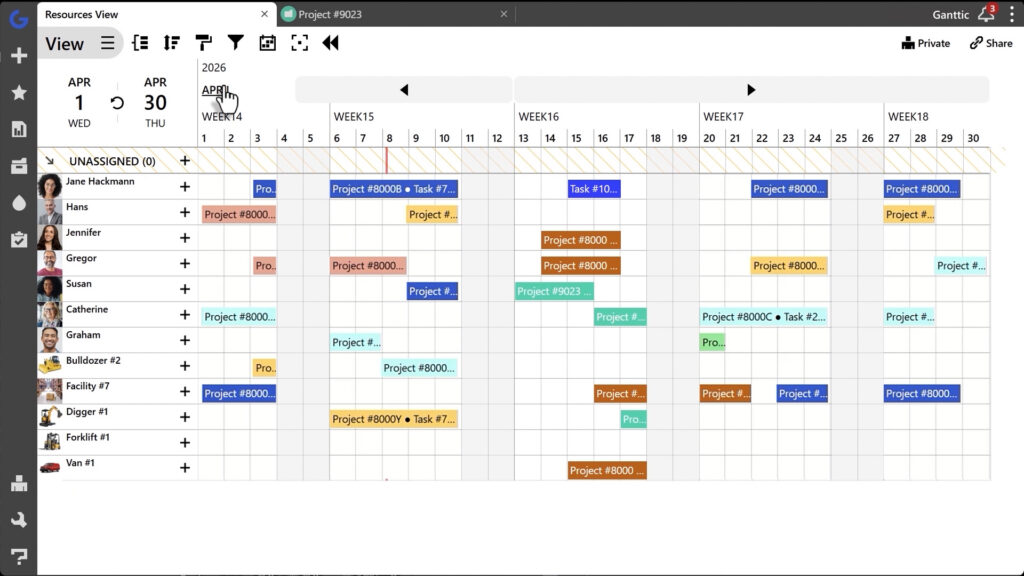
Team-by-team spreadsheets hide overlaps. One specialist gets promised to two projects while someone else sits on the bench. A central pool puts people, equipment, vehicles and rooms in one plan, with one owner for allocation decisions.
Q Agency, a Croatian software company of about 250 people, made this move in 2020. Resourcing left the delivery teams for a dedicated department, and Ganttic later replaced the Excel and Google Sheets plans.
Resources View in Ganttic:
How Ganttic does it
Anything you book becomes a resource on one timeline, with vacations, public holidays and PTO right next to the work.
Skills and certifications go into resource Data Fields, so you can filter for the right person. As an example, Q Agency, our client, pulls time off straight from its HR system through the Ganttic API.
Regarding pricing, users are unlimited under resource-based pricing, and user permissions are set per project. Field staff follow their schedule in the Ganttic Planner app for Android and iOS, with notifications when something changes.
Only one in five practitioners in PMI’s survey use scenario planning. Resource planners can start small. Put confirmed and probable work in the same plan, give each likely project realistic dates and effort, and decide in advance who or what you’d move if it gets approved.
How Ganttic does it
Unassigned tasks let you lay out a likely project’s structure and timing without naming anyone.
Add them to a department’s filtered Custom View, and the lead sees pipeline work sitting above the people who are already booked. Once the project is approved, drag each task onto a resource. Its effect on that person’s utilization shows up right away.
A schedule booked to 100% has no room for a slipped deadline or a rushed request.
PMI found that four out of five complex projects suffered negative fallout, including strained team morale. Pick a utilization target below full capacity for your most requested people and equipment, and rebalance as soon as someone goes over it.
How Ganttic does it
With Task Timing and Utilization settings, you can book someone at 50% on two parallel tasks. If their total passes 100%, the load graph turns red. Utilization tracking shows a percentage next to each resource and a total for each group, so you’ll see who is stretched before it turns into burnout and then drag work to someone with room.
Two approved projects need the same resource in the same week. If leadership has already agreed on a ranking, the planner can answer on the spot. Base the ranking on criteria such as contract deadlines, client commitments or margin, and review it every quarter.
How Ganttic does it
Create a priority field for projects with custom Data Fields and filter your views by it. The all-projects portfolio Gantt chart shows each resource’s work across every project, so you’ll see a clash before it lands on the schedule. Give top-priority projects their own project color so they stand out on the timeline.
Start 2027 capacity planning before January
For companies on a calendar fiscal year, 2027 budgets and hiring plans are being set right now. Put these resource management strategies in place this quarter, and you start the year with a baseline you can adjust when the first surprise comes.
Ganttic charges per planned resource, and every plan on the pricing page comes with the full feature set and unlimited users. To see your own setup in Ganttic, book a personal demo with our team!
FAQ
Four work well when demand is hard to predict. Keep every resource in one central pool, plan demand in scenarios, set utilization targets with a buffer, and agree on priority rules before projects collide.
Keep confirmed and probable work in the same plan. Give likely projects dates and effort, leave their tasks unassigned until they’re approved, and review it all weekly, so you see where a new deal would land before you say yes.
Resource management covers allocating, scheduling and tracking people and equipment. Capacity planning is one part of it. It compares the work you expect with the hours and assets you’ll have, usually weeks or months ahead.
Yes. In Ganttic, anything you need to book is a resource, from employees to machinery, vehicles and facilities. You pay per scheduled resource, and user accounts are unlimited.