Resource plan examples
With even a simple resource management plan, you’ll have a roadmap of your projects, tasks, and the resources assigned to do the work.
There’s no one template of a resource plan because it depends on the industry, resource pool, project timelines, and how much detail added. However, every one should include clear visuals and the time period that you’ll be working in.
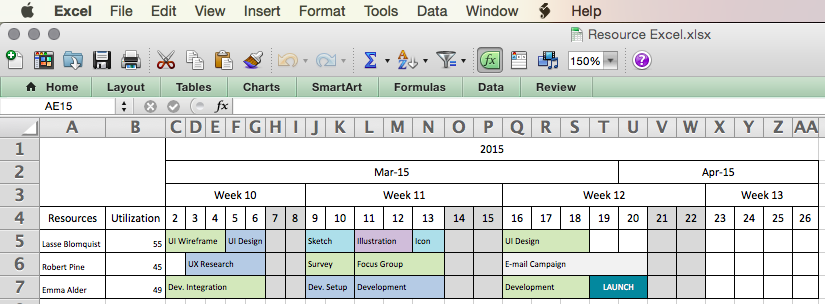
A resource plan can be created using a simple spreadsheet template. An example can be seen below:
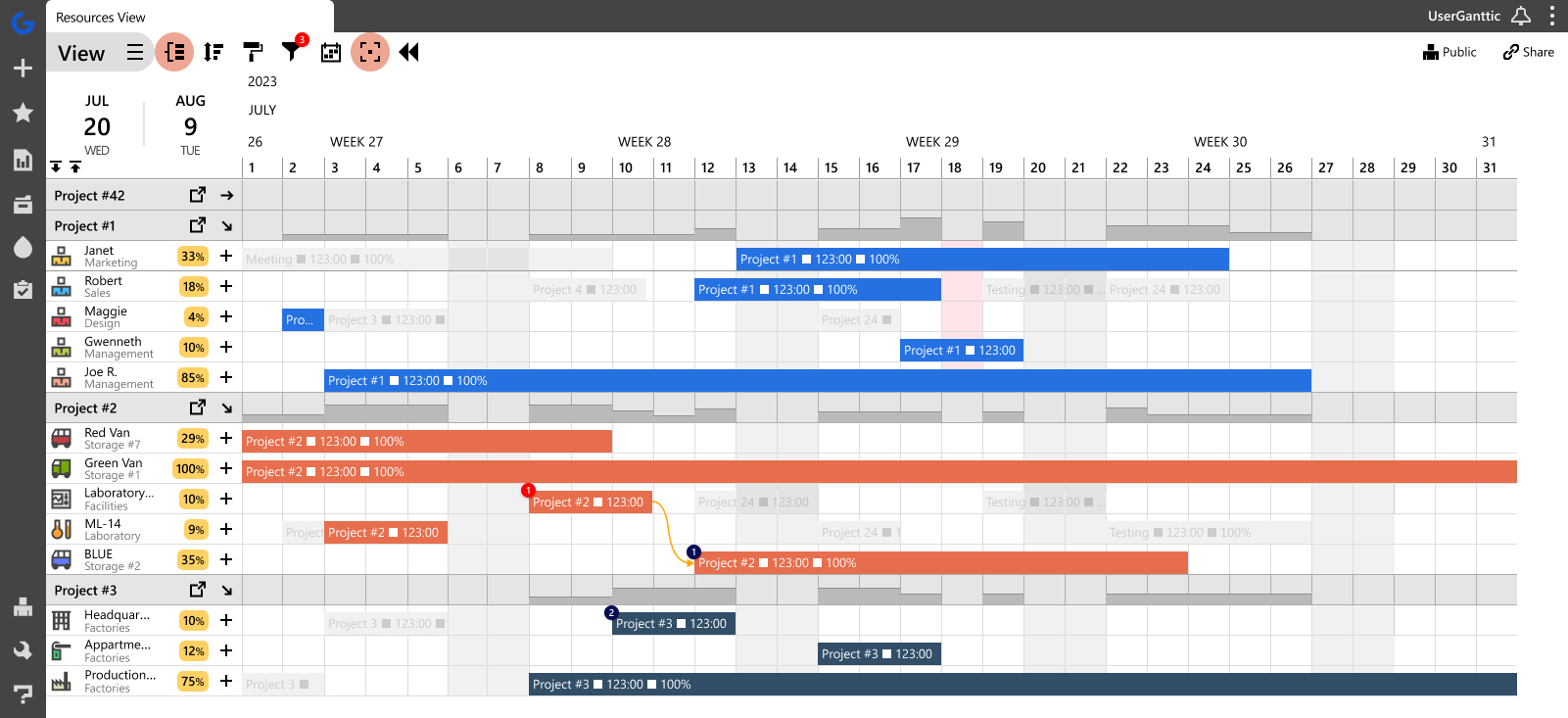
One can also be made with resource planning tools. Here’s an example of a resource management plan created in Ganttic. Here you see all the resources, grouped by projects, with their tasks, dependencies, and utilization for the timeframe.
Why create a resource management plan?
A resource planning approach allows you to isolate ever-changing project variables and schedule around them realistically. This eliminates unintentional task overlap and prevents double-booking team members across multiple projects. Ultimately, a solid resource plan optimizes your capacity, improving overall efficiency and output.
Project managers who skip resource planning overlook critical constraints that derail timelines. Below are common examples of how inadequate planning undermines workflow efficiency, along with actionable steps to maintain control over your schedules.
3 strategies for building a resource plan
Although the building blocks of a resource management plan are usually similar, there are many different resource management processes and techniques to build those plans.
When the resources are shared, the variety of tools and techniques can cause a ton of miscommunications, wasted time, and energy. While the obvious solution might be opting to a company-wide resource management tool and resource management technique, it’s definitely easier said than done.
There’s high-level resource management and detailed resource management. The general rule of thumb is that high-level resource management is done to get an overview of the resource allocation in the project portfolio. While detailed resource management is basically done to create a to-do list for the resources. Basically, one is for the managers, the other is for the team.
On a higher level, we see that the resource management techniques that are used most often are:
Project-based resource planning
That’s where projects are at the top of the project management food chain and resources are just means to an end. Project resource planning is often more about planning than optimization. It’s allocating resources to tasks not tasks to resources. It’s about staffing projects and not optimal resource utilization.
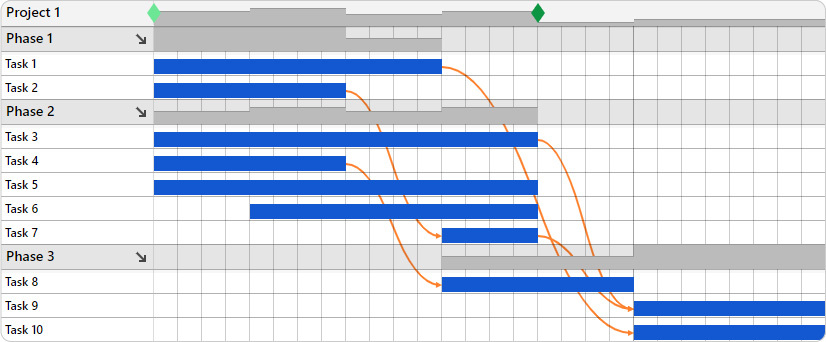 A project-based plan built in Ganttic. Here we see everything from the project’s perspective.
Resource-based project planning
It’s resource planning for projects, so just like project-based resource planning but the other way around. The main thing is to keep resource utilization at an optimal level. Tasks are allocated to resources and projects are left on the background.
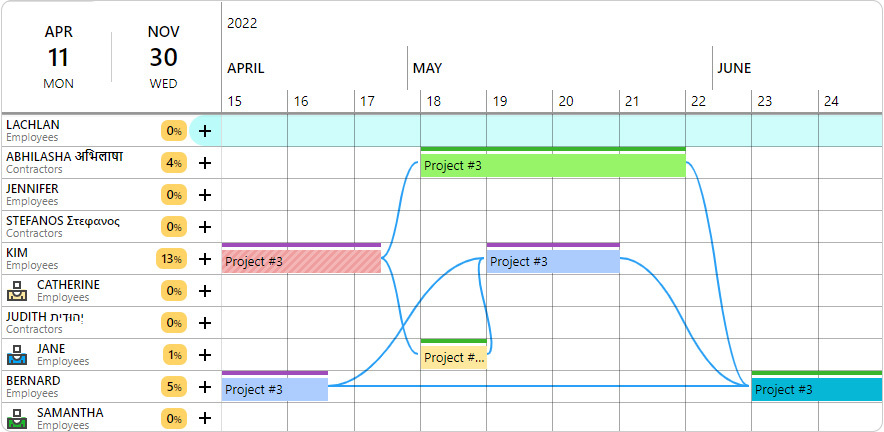 A resource-based plan created in Ganttic. Here the resource management plan is created from the resources’ POV.
Matrix planning
Matrix planning takes the best of both worlds and it’s the resource management process described earlier. This means allocating tasks to resources while keeping an eye on the resource capacity and the project capacity and making sure that the resources are allocated to maximize project efficiency but are still optimally utilized. It’s planning for one project and pivoting the resource plan to see how it all comes together.
Ganttic is one of the most unique planning tools on the market, as it allows for this duo-visibility.
Every resource plan you make can be switched between the resources’ POV and the projects. Wanna see more? Book a chat and have a personalized tour of the platform.
Best practices for an effective resource management plan
When developing your resource plan, keep these things in mind.
Start simple
A good resource management plan involves a lot of complex data and input from organization members. This means a lot of time and effort are required. If you start with a simple resource plan, with just a rundown of your team, their skills, and what they are engaged in, it’s a lot easier to add and iterate on as you go.
Be accessible & involve stakeholders
It is essential to involve stakeholders in the resource planning process to ensure that their needs and expectations are considered.
All the resource managers, project managers, and project portfolio managers should be able to see and edit the same resource plan. Everyone that schedules resources, should be able to view the bookings that the other managers have made. That kind of resource management practice ensures transparency.
Transparency prevents miscommunications, boosts employee engagement, and reduces communicative noise.
Use dedicated software
Project and resource management software can help to simplify the resource planning process and provide real-time visibility into resource usage. Resource management is done to get an overview of resource allocation. It shouldn’t be a whole process. You should be able to see who’s doing what with a glance.
A good resource management plan isn’t merely a staff schedule, it has also information about the whereabouts of equipment, the bookings of rooms etc. In most cases, there is no need to have two or three different resource plans.
Develop contingency plans
It is essential to develop contingency plans to address potential risks and ensure that the project stays on track. Going back in history can be a necessity when estimating the scope for a new project or simply when estimating task duration. Time-traveling is a resource planning must. Your life is a lot easier if you can view your resource allocation per week, month, and year with few clicks.
Review and update resource plan regularly
Resource planning is an ongoing process, and it is essential to review and update the resource plan regularly to ensure that it remains relevant and effective. A resource management plan should be updated as often as needed. That can be in every few hours, once a day or weekly.
Steps to creating a resource plan
1. Build a single resource pool
A resource plan has a lot to do with matching the right tasks with the right resource. This means filling specific roles with the ideal candidate. In a way, this action will allow you to create your literal dream team.
Start by laying out everything you got. All the “whos” on your team as well as the “whats” – if you’ve got equipment and machinery to add to the mix. Once you have a resource overview, it’s a lot easier to schedule when the time comes.
Look for resource planning software with features like:
Filtering options.
Not every resource will be the right match. If you have a huge resource pool all the choices can get overwhelming. To prevent analysis paralysis, find a way to limit your options. Most software have different filtering options, so you can pick the criteria
2. Define project goals, details, and team roles
Consistently hitting project deadlines creates a reliable, stress-free workflow. You can achieve this predictability by developing a strategic project schedule.
- Start by outlining your primary objectives, execution strategy, and target timeframe. Incorporate essential project details, including site locations, required certifications, and budget constraints.
- Next, draft a baseline plan to verify you have the actual resource capacity to execute the work. If your current team lacks availability, adjust the timeline or bring in external contractors. Project variables will inevitably shift, so build flexibility into your initial framework to accommodate future adjustments.
This makes it simple and fast to schedule and reschedule tasks when the plans need to change. The feature makes the whole process as easy as its name conveys. Simply click drag and drop to create a new task or pick up an existing task and reallocate it to a different resource.
Learn more about the pros and cons of scheduling this way.
3. Add resources data and details

A resource plan goes beyond simply filling capacity; it requires designing schedules around your personnel to drive better project results.
Start by mapping out skill sets within a resource planning tool. When scheduling begins, you will know exactly who is qualified for specific tasks and who makes the best fit. This approach keeps projects on track while improving overall team dynamics.
When employees receive assignments suited to their unique skills, they recognize the strategic effort put into the planning process. Instead of feeling like interchangeable parts, they feel valued for their specific expertise.
Using Ganttic’s data fields, you can attach custom information to your resources, such as site locations, team leaders, spoken languages, or specialized skills. Filtering and sorting by this data helps you build the right balance of expertise and ensures you assign the most qualified person to every task.
4. Allocate resources
Allocating resources is where the plan takes shape. The approach you take depends on your specific management style.
You might prefer reviewing the project schedule to identify unassigned tasks, or you might find it more effective to schedule tasks directly onto the resource’s timeline. Regardless of your preferred method, the goal is to confirm your project has the correct resource capacity before any work begins.
Matrix planning gives you the flexibility to approach scheduling from multiple perspectives. You can build project timelines with unassigned tasks and allocate resources later.
Alternatively, you can assign tasks to your team first and then review the schedule from a project view. Both methods allow you to work within your preferred workflow while ensuring no scheduling details are overlooked.
5. Balance resource utilization
With some resource planners, you can manually adjust the utilization. This way, you can decide how much effort your resources put into their tasks. On the other hand, ineffective resource planning can lead to a distorted workload. For example, some of your resources might be overwhelmed with their tasks, while others don’t have enough on their plates to keep them busy.
Keeping utilization in check is especially useful if you have scheduled concurrent tasks for team members. Adjusting the levels yourself helps convey the need to focus more intently on one task as opposed to another.
Resource planning tools can give you a better overview of your various utilizations. That way you’ll know how occupied your resources are with their current tasks as well as with any other ongoing projects.
6. Share the plan

A meticulously crafted project schedule holds no value if your team cannot see it, track progress, or respond to real-time changes. Project managers invest significant effort into building these roadmaps, yet relying on inadequate software makes it incredibly difficult to keep everyone aligned.
This communication gap becomes obvious when using free resource planning templates or traditional spreadsheets. Critical data gets buried across multiple tabs, making version control a constant struggle. Sharing these files often requires expensive individual licenses or manual distribution through email attachments, which instantly creates outdated document versions.
Maintaining alignment is especially critical for organizations that rely on virtual working. Physical distance inherently complicates communication and makes it harder to keep distributed team members on task. If you still depend on static spreadsheets for remote team project management, you are likely experiencing firsthand why 46% of projects fail to meet their final deadlines.
Modern resource planning software ensures you can share schedules securely while maintaining full control over your data. Project managers can restrict or grant visibility by setting specific access and editing permissions for different users. You can also configure automated notifications to alert relevant team members the moment a timeline shifts. When updating executives, stakeholders, or external contractors, you can simply share the schedule using their email address, entirely eliminating the need to create and manage separate user accounts.
Real Life Case Study
When Pure Technologies began resource planning in Ganttic, they found the solution to dispersed resource scheduling they were searching for. Saying:
“We needed a better way to schedule a project so that we could see who would be involved and what equipment would be in use. Especially when teams were coming from three different offices nationwide and equipment was being shipped from anywhere in the country. We can track at least 80 pieces of equipment now as well, which wasn’t practical previously”
Read the full case study here.
7. Monitor costs and progress
No matter how meticulously you plan the budget of your project, inadequate resource scheduling can cause the entire initiative to fail. Unforeseen delays, late fees, overtime pay, and emergency hiring will quickly consume your allocated funds.
Preventing cost overruns requires two consistent habits: reviewing and re-forecasting. Regularly assess your current resource capacity, the time before completion, and your remaining capital. Once you establish this baseline, adjust your operational forecasts accordingly. Apply resource leveling techniques to extend timelines for lower-priority work. If strict deadlines make extending the project impossible, utilize resource smoothing to reallocate tasks within your existing timeframe. Consistent monitoring allows you to fix your budget proactively before minor scheduling conflicts turn into significant financial deficits.
You can assign custom financial values to your resources, such as the operational cost of machinery, a contractor’s fixed salary, or a freelancer’s hourly rate. Adding this data into report calculations allows you to automatically track expenses as you build your schedule.
Once resources are allocated, you will see exactly how much budget is consumed during a specific timeframe and can accurately project your remaining funds.
8. Review and reallocate
Your initial project plan will inevitably change. Priorities shift, team members take unexpected leave, and task scopes expand. Because you will need to reallocate resources mid-project, you must build realistic schedules with built-in flexibility. Anticipate capacity roadblocks early rather than waiting for conflicts to derail your timeline.
Look for resource planning software with features like:
Reporting
Effective optimization requires a critical review of your current scheduling processes. You must ensure your reporting accurately reflects project progress and verify that your team tracks the actual time spent on tasks. Analyzing this baseline data provides the comprehensive overview needed to refine your approach and make practical adjustments to future workflows.
9. Plan to be more effective
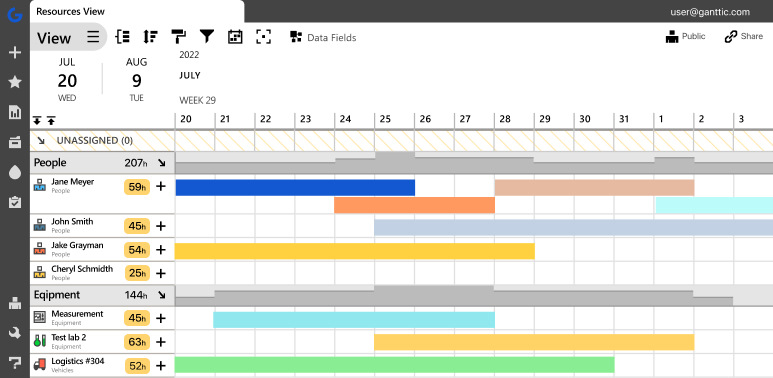 Ganttic is resource planning software that helps create an simple, visual resource management plan.
The primary purpose of resource planning software is to streamline workflows and ensure your team meets its strategic targets. Applying these core scheduling principles will help you avoid costly oversights and transform reactive task management into proactive resource allocation.